Pi0cket TinyPi Pro vs. Joyou A320+

Specs, emulation, community reviews, ownership and play history, side by side.

Compare
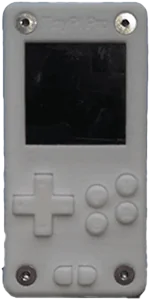
With
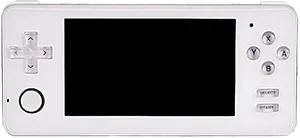
Not shown to scale. Real-world dimensions are missing for one or both devices.

Quick verdict

Better screen
TinyPi Pro
Newer model
TinyPi Pro

Main differences

  • Pi0cket TinyPi Pro has similar emulation coverage to Joyou A320+.
  • Pi0cket TinyPi Pro has a IPS screen, versus 60 Hz TFT on Joyou A320+.
  • Pi0cket TinyPi Pro runs Linux (RetroPie); Joyou A320+ runs µC/OS-II,.
  • Pi0cket TinyPi Pro is highlighted for Genesis, Game Boy, NES; Joyou A320+ is highlighted for GBA, SNES, Game Boy, NES.

Pi0cket

TinyPi Pro

Details
Price
Unknown
OS
Linux (RetroPie)
Released
Jun 2019
Up to
Genesis
Screen
1.3 inch IPS
Weight
Unknown

We’re not tracking prices for this one yet.

No reviews yet

Joyou

Joyou A320+

Details
Price
Unknown
OS
µC/OS-II,
Released
Jan 2013
Up to
Genesis
Screen
4.3 inch TFT
Weight
267 grams

We’re not tracking prices for this one yet.

No reviews yet

Specs

BetterWorse

SpecTinyPi ProJoyou A320+
OSLinux (RetroPie)µC/OS-II,
Screen1.3 inch4.3 inch
Aspect ratio1:130:17
Resolution240 x 240480 x 272
Refresh rateUnknown60 Hz
PanelIPSTFT
ChipsetBroadcom BCM2835Actions ATJ2279B
CPUARM1176JZF-SActions ATJ2279B
GPUBroadcom VideoCore IV"Built in GPU"
RAM512 MB DDR128 MB RAM
StorageExternal microSDInternal 16 GB & External MicroSD
Battery400 mAh2300 mAh
WeightUnknown267 grams
DimensionsUnknown167.5 mm x 75 mm x 17 mm
Video outYesNo

Emulation

Excellent › Good › Playable › Limited › Unsupported

SystemTinyPi ProJoyou A320+
Classic systems
Game Boy
NES
Genesis
GBA
SNES
PS1
Mid-generation systems
DS
N64
Dreamcast
PSP
Saturn
Sixth-generation systems
GameCube
Wii
PS2
Modern systems
3DS
Switch
Wii U
PS3

Emulation source notes

  • TinyPi Pro DS: Nintendo DS: Either cannot run any games at all or games are unplayably slow
  • Joyou A320+ DS: Nintendo DS: Either cannot run any games at all or games are unplayably slow
  • TinyPi Pro 3DS: Nintendo 3DS: Either cannot run any games at all or games are unplayably slow
  • Joyou A320+ 3DS: Nintendo 3DS: Either cannot run any games at all or games are unplayably slow
  • TinyPi Pro GBA: Nintendo Game Boy Advance: Most games playable at full speed, a few games have lower frame rates but still mostly playable with frameskip
  • Joyou A320+ GBA: Nintendo Game Boy Advance: Most games playable at full speed, a few games have lower frame rates but still mostly playable with frameskip
  • TinyPi Pro N64: Nintendo 64: Only the easiest to emulate games are barely playable
  • Joyou A320+ N64: Nintendo 64: Either cannot run any games at all or games are unplayably slow
  • TinyPi Pro NES: Nintendo Entertainment System: Almost all games playable at full speed without frameskip
  • Joyou A320+ NES: Nintendo Entertainment System: Almost all games playable at full speed without frameskip
  • TinyPi Pro PS1: Sony Playstation: Most games playable but mostly with frameskip, struggles with harder to emulate games
  • Joyou A320+ PS1: Sony Playstation: Most games playable but mostly with frameskip, struggles with harder to emulate games
  • TinyPi Pro PS2: Sony Playstation 2: Either cannot run any games at all or games are unplayably slow
  • Joyou A320+ PS2: Sony Playstation 2: Either cannot run any games at all or games are unplayably slow
  • TinyPi Pro PS3: Sony Playstation 3: Either cannot run any games at all or games are unplayably slow
  • Joyou A320+ PS3: Sony Playstation 3: Either cannot run any games at all or games are unplayably slow
  • TinyPi Pro PSP: Sony Playstation Portable: Either cannot run any games at all or games are unplayably slow
  • Joyou A320+ PSP: Sony Playstation Portable: Either cannot run any games at all or games are unplayably slow
  • TinyPi Pro Wii: Nintendo Wii: Either cannot run any games at all or games are unplayably slow
  • Joyou A320+ Wii: Nintendo Wii: Either cannot run any games at all or games are unplayably slow
  • TinyPi Pro SNES: Super Nintendo Entertainment System: Most games playable at full speed, a few games have lower frame rates but still mostly playable with frameskip
  • Joyou A320+ SNES: Super Nintendo Entertainment System: Most games playable at full speed, a few games have lower frame rates but still mostly playable with frameskip
  • TinyPi Pro Wii U: Nintendo Wii U: Either cannot run any games at all or games are unplayably slow
  • Joyou A320+ Wii U: Nintendo Wii U: Either cannot run any games at all or games are unplayably slow
  • TinyPi Pro Saturn: Sega Saturn: Either cannot run any games at all or games are unplayably slow
  • Joyou A320+ Saturn: Sega Saturn: Either cannot run any games at all or games are unplayably slow
  • TinyPi Pro Switch: Nintendo Switch: Either cannot run any games at all or games are unplayably slow
  • Joyou A320+ Switch: Nintendo Switch: Either cannot run any games at all or games are unplayably slow
  • TinyPi Pro Genesis: Sega Genesis / Mega Drive: Almost all games playable at full speed without frameskip
  • Joyou A320+ Genesis: Sega Genesis / Mega Drive: Most games playable at full speed, a few games have lower frame rates but still mostly playable with frameskip
  • TinyPi Pro Game Boy: Game Boy / Game Boy Color: Almost all games playable at full speed without frameskip
  • Joyou A320+ Game Boy: Game Boy / Game Boy Color: Almost all games playable at full speed without frameskip
  • TinyPi Pro GameCube: Nintendo GameCube: Either cannot run any games at all or games are unplayably slow
  • Joyou A320+ GameCube: Nintendo GameCube: Either cannot run any games at all or games are unplayably slow
  • TinyPi Pro Dreamcast: Sega Dreamcast: Either cannot run any games at all or games are unplayably slow
  • Joyou A320+ Dreamcast: Sega Dreamcast: Either cannot run any games at all or games are unplayably slow

Frequently asked

What's the difference between the Pi0cket TinyPi Pro and the Joyou A320+?
Pi0cket TinyPi Pro has similar emulation coverage to Joyou A320+. Pi0cket TinyPi Pro has a IPS screen, versus 60 Hz TFT on Joyou A320+. Pi0cket TinyPi Pro runs Linux (RetroPie); Joyou A320+ runs µC/OS-II,. Pi0cket TinyPi Pro is highlighted for Genesis, Game Boy, NES; Joyou A320+ is highlighted for GBA, SNES, Game Boy, NES.
Which is newer, the Pi0cket TinyPi Pro or the Joyou A320+?
The Pi0cket TinyPi Pro is the newer model, released in 2019.

Compare TinyPi Pro with

JinXing DigitalJXD 100Specs
Retro Genesis Russia, Hamy / QiShengLongGopher 2Specs