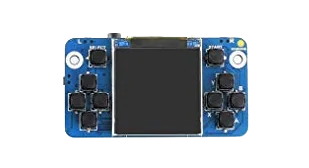
Device comparison

PowKiddy Q20 Mini vs. PowKiddy RGB10

Compare specs, emulation support, community reviews, ownership, and play history.

Compare
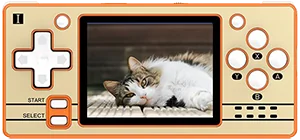
With
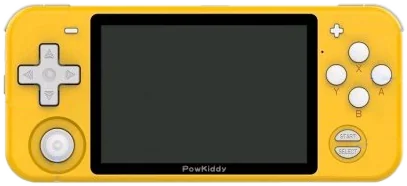
PowKiddy Q20 Mini
PowKiddy RGB10

Shown to scale from each device’s real-world dimensions.

Quick verdict

Best value
PowKiddy Q20 Mini
More portable
PowKiddy Q20 Mini
Newer model
PowKiddy Q20 Mini

Main differences

  • PowKiddy RGB10 has stronger listed emulation coverage.
  • PowKiddy Q20 Mini is about $40 cheaper based on catalog pricing.
  • PowKiddy Q20 Mini is roughly 28% smaller and 43% lighter.
  • PowKiddy Q20 Mini runs NxHope; PowKiddy RGB10 runs RetroArch.
  • PowKiddy Q20 Mini is highlighted for Game Boy, NES, Genesis; PowKiddy RGB10 is highlighted for Game Boy, NES, Genesis, GBA.

PowKiddy

PowKiddy Q20 Mini

Details
Price
$40
OS
NxHope
Released
Jul 2021
Up to
Genesis
Screen
2.4 inch IPS
Weight
82 grams

No reviews yet

0 collectors

PowKiddy

PowKiddy RGB10

Details
Price
$80
OS
RetroArch
Released
Jul 2020
Up to
DS
Screen
3.5 inch IPS
Weight
144 grams

No reviews yet

0 collectors

Specs

BetterWorse

SpecPowKiddy Q20 MiniPowKiddy RGB10
Price$40$80
OSNxHopeRetroArch
Screen2.4 inch3.5 inch
Aspect ratio4:33:2
Resolution320 x 240480 x 320
ChipsetAllwinner F1C100SRockChip RK3326
CPUARM926EJ-SCortex-A35
GPU2D acceleratorMali-G31 MP2
RAM32 MB SDRAM1 GB DDR3
StorageInternal 16 GB & External MicroSDExternal MicroSD
Battery1200 mAh2800 mAh / 3500 mAh (Metal / Pro)
Weight82 grams144 grams
Dimensions118 mm x 55 mm x 15 mm144 mm x 63 mm x 16 mm

Emulation

Excellent › Good › Playable › Limited › Unsupported

SystemPowKiddy Q20 MiniPowKiddy RGB10
Classic systems
Game Boy
NES
Genesis
GBA
SNES
PS1
Mid-generation systems
DS
N64
Dreamcast
PSP
Saturn
Sixth-generation systems
GameCube
Wii
PS2
Modern systems
3DS
Switch
Wii U
PS3

Emulation source notes

  • PowKiddy Q20 Mini DS: Nintendo DS: Either cannot run any games at all or games are unplayably slow
  • PowKiddy RGB10 DS: Nintendo DS: Most games playable at full speed, a few games have lower frame rates but still mostly playable with frameskip This device does not have a touchscreen, so you won't be able to play DS games that rely heavily on the touchscreen
  • PowKiddy Q20 Mini 3DS: Nintendo 3DS: Either cannot run any games at all or games are unplayably slow
  • PowKiddy RGB10 3DS: Nintendo 3DS: Either cannot run any games at all or games are unplayably slow
  • PowKiddy Q20 Mini GBA: Nintendo Game Boy Advance: Most games playable at full speed, a few games have lower frame rates but still mostly playable with frameskip
  • PowKiddy RGB10 GBA: Nintendo Game Boy Advance: Almost all games playable at full speed without frameskip
  • PowKiddy Q20 Mini N64: Nintendo 64: Either cannot run any games at all or games are unplayably slow
  • PowKiddy RGB10 N64: Nintendo 64: Most games playable but mostly with frameskip, struggles with harder to emulate games
  • PowKiddy Q20 Mini NES: Nintendo Entertainment System: Almost all games playable at full speed without frameskip
  • PowKiddy RGB10 NES: Nintendo Entertainment System: Almost all games playable at full speed without frameskip
  • PowKiddy Q20 Mini PS1: Sony Playstation: Only the easiest to emulate games are barely playable
  • PowKiddy RGB10 PS1: Sony Playstation: Almost all games playable at full speed without frameskip
  • PowKiddy Q20 Mini PS2: Sony Playstation 2: Either cannot run any games at all or games are unplayably slow
  • PowKiddy RGB10 PS2: Sony Playstation 2: Either cannot run any games at all or games are unplayably slow
  • PowKiddy Q20 Mini PS3: Sony Playstation 3: Either cannot run any games at all or games are unplayably slow
  • PowKiddy RGB10 PS3: Sony Playstation 3: Either cannot run any games at all or games are unplayably slow
  • PowKiddy Q20 Mini PSP: Sony Playstation Portable: Either cannot run any games at all or games are unplayably slow
  • PowKiddy RGB10 PSP: Sony Playstation Portable: Most games playable but mostly with frameskip, struggles with harder to emulate games
  • PowKiddy Q20 Mini Wii: Nintendo Wii: Either cannot run any games at all or games are unplayably slow
  • PowKiddy RGB10 Wii: Nintendo Wii: Either cannot run any games at all or games are unplayably slow
  • PowKiddy Q20 Mini SNES: Super Nintendo Entertainment System: Most games playable but mostly with frameskip, struggles with harder to emulate games
  • PowKiddy RGB10 SNES: Super Nintendo Entertainment System: Almost all games playable at full speed without frameskip
  • PowKiddy Q20 Mini Wii U: Nintendo Wii U: Either cannot run any games at all or games are unplayably slow
  • PowKiddy RGB10 Wii U: Nintendo Wii U: Either cannot run any games at all or games are unplayably slow
  • PowKiddy Q20 Mini Saturn: Sega Saturn: Either cannot run any games at all or games are unplayably slow
  • PowKiddy RGB10 Saturn: Sega Saturn: Only the easiest to emulate games are barely playable
  • PowKiddy Q20 Mini Switch: Nintendo Switch: Either cannot run any games at all or games are unplayably slow
  • PowKiddy RGB10 Switch: Nintendo Switch: Either cannot run any games at all or games are unplayably slow
  • PowKiddy Q20 Mini Genesis: Sega Genesis / Mega Drive: Almost all games playable at full speed without frameskip
  • PowKiddy RGB10 Genesis: Sega Genesis / Mega Drive: Almost all games playable at full speed without frameskip
  • PowKiddy Q20 Mini Game Boy: Game Boy / Game Boy Color: Almost all games playable at full speed without frameskip
  • PowKiddy RGB10 Game Boy: Game Boy / Game Boy Color: Almost all games playable at full speed without frameskip
  • PowKiddy Q20 Mini GameCube: Nintendo GameCube: Either cannot run any games at all or games are unplayably slow
  • PowKiddy RGB10 GameCube: Nintendo GameCube: Either cannot run any games at all or games are unplayably slow
  • PowKiddy Q20 Mini Dreamcast: Sega Dreamcast: Either cannot run any games at all or games are unplayably slow
  • PowKiddy RGB10 Dreamcast: Sega Dreamcast: Most games playable but mostly with frameskip, struggles with harder to emulate games

Frequently asked

What's the difference between the PowKiddy Q20 Mini and the PowKiddy RGB10?
PowKiddy RGB10 has stronger listed emulation coverage. PowKiddy Q20 Mini is about $40 cheaper based on catalog pricing. PowKiddy Q20 Mini is roughly 28% smaller and 43% lighter. PowKiddy Q20 Mini runs NxHope; PowKiddy RGB10 runs RetroArch. PowKiddy Q20 Mini is highlighted for Game Boy, NES, Genesis; PowKiddy RGB10 is highlighted for Game Boy, NES, Genesis, GBA.
Which is cheaper, the PowKiddy Q20 Mini or the PowKiddy RGB10?
The PowKiddy Q20 Mini is the cheaper of the two at around $40, roughly $40 less than the PowKiddy RGB10 based on catalog pricing.
Which is newer, the PowKiddy Q20 Mini or the PowKiddy RGB10?
The PowKiddy Q20 Mini is the newer model, released in 2021.

Compare PowKiddy Q20 Mini with