Excellent › Good › Playable › Limited › Unsupported
System
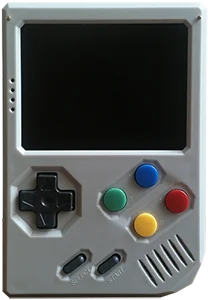
Retrostone 1
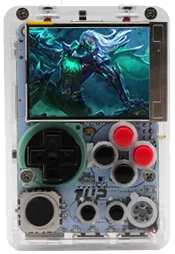
1UP Pi-Boy Micro
Classic systems
Game Boy
NES
Genesis
GBA
SNES
PS1
Mid-generation systems
DS
N64
Dreamcast
PSP
Saturn
Sixth-generation systems
GameCube
Wii
PS2
Modern systems
3DS
Switch
Wii U
PS3
Emulation source notes
Retrostone 1 DS: Nintendo DS: Most games playable but mostly with frameskip, struggles with harder to emulate games
This device does not have a touchscreen, so you won't be able to play DS games that rely heavily on the touchscreen
1UP Pi-Boy Micro DS: Nintendo DS: Most games playable but mostly with frameskip, struggles with harder to emulate games
This device does not have a touchscreen, so you won't be able to play DS games that rely heavily on the touchscreen
Retrostone 1 3DS: Nintendo 3DS: Either cannot run any games at all or games are unplayably slow
1UP Pi-Boy Micro 3DS: Nintendo 3DS: Either cannot run any games at all or games are unplayably slow
Retrostone 1 GBA: Nintendo Game Boy Advance: Almost all games playable at full speed without frameskip
1UP Pi-Boy Micro GBA: Nintendo Game Boy Advance: Almost all games playable at full speed without frameskip
Retrostone 1 N64: Nintendo 64: Most games playable at full speed, a few games have lower frame rates but still mostly playable with frameskip
1UP Pi-Boy Micro N64: Nintendo 64: Most games playable but mostly with frameskip, struggles with harder to emulate games
Retrostone 1 NES: Nintendo Entertainment System: Almost all games playable at full speed without frameskip
1UP Pi-Boy Micro NES: Nintendo Entertainment System: Almost all games playable at full speed without frameskip
Retrostone 1 PS1: Sony Playstation: Almost all games playable at full speed without frameskip
1UP Pi-Boy Micro PS1: Sony Playstation: Almost all games playable at full speed without frameskip
Retrostone 1 PS2: Sony Playstation 2: Either cannot run any games at all or games are unplayably slow
1UP Pi-Boy Micro PS2: Sony Playstation 2: Either cannot run any games at all or games are unplayably slow
Retrostone 1 PS3: Sony Playstation 3: Either cannot run any games at all or games are unplayably slow
1UP Pi-Boy Micro PS3: Sony Playstation 3: Either cannot run any games at all or games are unplayably slow
Retrostone 1 PSP: Sony Playstation Portable: Only the easiest to emulate games are barely playable
1UP Pi-Boy Micro PSP: Sony Playstation Portable: Only the easiest to emulate games are barely playable
Retrostone 1 Wii: Nintendo Wii: Either cannot run any games at all or games are unplayably slow
1UP Pi-Boy Micro Wii: Nintendo Wii: Either cannot run any games at all or games are unplayably slow
Retrostone 1 SNES: Super Nintendo Entertainment System: Almost all games playable at full speed without frameskip
1UP Pi-Boy Micro SNES: Super Nintendo Entertainment System: Almost all games playable at full speed without frameskip
Retrostone 1 Wii U: Nintendo Wii U: Either cannot run any games at all or games are unplayably slow
1UP Pi-Boy Micro Wii U: Nintendo Wii U: Either cannot run any games at all or games are unplayably slow
Retrostone 1 Saturn: Sega Saturn: Only the easiest to emulate games are barely playable
1UP Pi-Boy Micro Saturn: Sega Saturn: Only the easiest to emulate games are barely playable
Retrostone 1 Switch: Nintendo Switch: Either cannot run any games at all or games are unplayably slow
1UP Pi-Boy Micro Switch: Nintendo Switch: Either cannot run any games at all or games are unplayably slow
Retrostone 1 Genesis: Sega Genesis / Mega Drive: Almost all games playable at full speed without frameskip
1UP Pi-Boy Micro Genesis: Sega Genesis / Mega Drive: Almost all games playable at full speed without frameskip
Retrostone 1 Game Boy: Game Boy / Game Boy Color: Almost all games playable at full speed without frameskip
1UP Pi-Boy Micro Game Boy: Game Boy / Game Boy Color: Almost all games playable at full speed without frameskip
Retrostone 1 GameCube: Nintendo GameCube: Either cannot run any games at all or games are unplayably slow
1UP Pi-Boy Micro GameCube: Nintendo GameCube: Either cannot run any games at all or games are unplayably slow
Retrostone 1 Dreamcast: Sega Dreamcast: Most games playable but mostly with frameskip, struggles with harder to emulate games
1UP Pi-Boy Micro Dreamcast: Sega Dreamcast: Most games playable but mostly with frameskip, struggles with harder to emulate games
Frequently asked
What's the difference between the 8BCraft Retrostone 1 and the 1UP Pi-Boy Micro?
1UP Pi-Boy Micro has similar emulation coverage to 8BCraft Retrostone 1. 8BCraft Retrostone 1 is about $8 cheaper based on catalog pricing. 1UP Pi-Boy Micro is roughly 45% smaller. 1UP Pi-Boy Micro has a 60 Hz IPS screen, versus 60 Hz Analog TFT on 8BCraft Retrostone 1. 1UP Pi-Boy Micro runs Linux (RetroPie); 8BCraft Retrostone 1 runs Linux - RetrorangePi.
Which is cheaper, the 8BCraft Retrostone 1 or the 1UP Pi-Boy Micro?
The 8BCraft Retrostone 1 is the cheaper of the two at around $157, roughly $8 less than the 1UP Pi-Boy Micro based on catalog pricing.